Monday, 3 December 2012

Don't use .NET System.Uri.UnescapeDataString in URL Decoding

Don't use .NET System.Uri.UnescapeDataString in URL Decoding

URL Encoding should encode Space into "+" or "%20". URL Decoding should decode "+" or "20" into Space. However by design, System.Uri.UnescapeDataString doesn't decode "+" into Space.

The MSDN remark of Uri.UnescapeDataString says:
 “Many Web browsers escape spaces inside of URIs into plus ("+") characters; however, the UnescapeDataString method does not convert plus characters into spaces because this behavior is not standard across all URI schemes.”

The issue will rise when your web application has query string like:


If you use System.Uri.UnescapeDataString to decode the query string value "just+do+it", the result is "just+do+it" instead of "just do it".  When the downstream application need to URL encode the value again, it becomes "just%2bdo%2bit ". The final URL will looks like


The spaces get lost and application could interpret the value as "just+do+it" instead of "just do it".

Detailed discussion:

RFC2396 defined reserved characters such as &, $, + and excluded characters such as space, %, < > must be escaped (URL encoded) when used as values in query string of URL in order to keep the original meaning of the character.

For example: to pass information such as

Products : Windows&Office Price: $200 Comment: In Stock Sign:+

The URL could be
http://www.ms.com/default.aspx?Products=Windows%26Office&Price=%24200&Comment=In%20Stock&sign=%2b
or
http://www.ms.com/default.aspx?Products=Windows%26Office&Price=%24200&Comment=In+Stock&sign=%2b

URL may be used as return URL value in other URL. In the case, the URL need to be encoded and already encoded characters will be double encoded.

http%3a%2f%2fwww.ms.com%2fdefault.aspx%3fProducts%3dWindows%2526Office%26Price%3d%2524200%26Comment%3dIn%2520Stock%26sign%3d%252b

or

http%3a%2f%2fwww.ms.com%2fdefault.aspx%3fProducts%3dWindows%2526Office%26Price%3d%2524200%26Comment%3dIn%2bStock%26sign%3d%252b


Characters
Single Encoded
Double Encoded
&
%26
%2526
$
%24
%2524
+
%2b
%252b
Space
%20, +
%2520, %2b
%
%25
%2525
%3c
%253c

Notice Space's single encoding can be "+" and double encoding can be "%2b" and + sign's single encoding is %2b.

If the function doesn't handle the encoding properly, the original meaning of the character could be lost in transaction.

The right encoding or decoding methods should do what the above table defines.

.NET encoding methods

Characters
HttpUtility.UrlEncode
System.Uri.EscapeDataString
System.Uri.EscapeUriString
&
%26
%26
&
$
%24
%24
$
+
%2b
%2B
+
Space
+
%20
%20
%
%25
%25
%25
%3c
%3C
%3C

Notice:

1. System.Uri.EscapeUriString doesn't encode RFC reserved characters
2. URLEncode encodes Space as "+" and EscapeDataString encode Space as "%20".
3. To encode the whole URL as return URL, EscapdeUriString should not be used.

.NET Methods
http://www.ms.com/default.aspx?Products=Windows%26Office&Price=%24200&Comment=In+Stock&sign=%2b
URLEncode
http%3a%2f%2fwww.ms.com%2fdefault.aspx%3fProducts%3dWindows%2526Office%26Price%3d%2524200%26Comment%3dIn%2bStock%26sign%3d%252b
EscapeDataString
http%3A%2F%2Fwww.ms.com%2Fdefault.aspx%3FProducts%3DWindows%2526Office%26Price%3D%2524200%26Comment%3DIn%2BStock%26sign%3D%252b
EscapdeUriString
(not right)
http://www.ms.com/default.aspx?Products=Windows%2526Office&Price=%2524200&Comment=In+Stock&sign=%252b
Or
.NET Methods
http://www.ms.com/default.aspx?Products=Windows%26Office&Price=%24200&Comment=In%20Stock&sign=%2b
URLEncode
http%3a%2f%2fwww.ms.com%2fdefault.aspx%3fProducts%3dWindows%2526Office%26Price%3d%2524200%26Comment%3dIn%2520Stock%26sign%3d%252b
EscapeDataString
http%3A%2F%2Fwww.ms.com%2Fdefault.aspx%3FProducts%3DWindows%2526Office%26Price%3D%2524200%26Comment%3DIn%2520Stock%26sign%3D%252b
EscapdeUriString
(not right)
http://www.ms.com/default.aspx?Products=Windows%2526Office&Price=%2524200&Comment=In%2520Stock&sign=%252b

There are two decoding methods in .NET
Encoded Characters
HttpUtility.UrlDecode
System.Uri.UnescapeDataString
%26
&
&
%24
$
$
%2b
+
+
%20
Space
Space
+
Space
+
%25
%
%
%3c

Notice that UrlDecode UnescapeDataString decode "+" differently. This will cause problem when decoding return URL which contains double encoded Space as "%2b".

For example:         "Comment%3dIn%2bStock" in encoded return URL should be double decoded into

Variable: "Comment"          Value: "In Stock"

Call UrlDecode twice on it

"Comment%3dIn%2bStock"  à "Comment=In+Stock" à "Comment=In Stock"

Call UnescapeDataString twice on it

"Comment%3dIn%2bStock"  à "Comment=In+Stock" à "Comment=In+Stock"

The original string "In Stock" is broken by UnescapeDataString.

If the downstream application assumes the URL string had be restored to not encoded format "In Stock" and use it as input to encode it again, the single encoding will become

"Comment=In+Stock" à "Comment%3dIn%2bStock"

Instead of

"Comment=In Stock" à "Comment=In+Stock"


Conclusion:

Since an application has no control of its upstream (use input or config), it can only assume the right encoding is in the URL query string: Single encoded special character as query string parameter value. Especially the Space can be "+" or "%20". When the URL needs to used as return URL in query string, it must be encoded again. Space will be double encoded as "%2b" or %2520".

When the receiving application received the encoded URL, if it uses method like UnescapeDataString for decoding, the "%2b" will not decoded into Space, Instead it becomes "+" as final result.

Developer should avoid encoding Space into "+" or double encoded into "%2b". It is recommended that when encode URL use "System.Uri.EscapeDataString", when decode URL use " HttpUtility.UrlDecode"

Tester should ensure that

1. Reserved and Excluded characters as defined by RFC2396 should be singled encode when used as value in query string of URL as next table. (URL as links, config values or test values).

2. If the URL is used in return URL or value of another query string, the Reserved and Excluded characters should be doubled encoded as next table.

Characters
Single Encoded
Double Encoded
&
%26
%2526
$
%24
%2524
+
%2b
%252b
Space
%20, +
%2520, %2b
%
%25
%2525
%3c
%253c

Two test URL can be

http://www.ms.com/default.aspx?Products=Windows%26Office&Price=%24200&Comment=In%20Stock&sign=%2b
or
http://www.ms.com/default.aspx?Products=Windows%26Office&Price=%24200&Comment=In+Stock&sign=%2b

source: http://blogs.msdn.com/b/yangxind/archive/2006/11/09/don-t-use-net-system-uri-unescapedatastring-in-url-decoding.aspx

Thursday, 22 November 2012

Tips for Windows Server 2008 and IIS7 Tuning

Recently I moved from windows servers 2003 32 bit and IIS6 to windows servers 2008 64 bit and IIS7. My experience was rather painful, windows 2008 seems like a wild animal after windows 2003 experience. 2008 has lots networking and scalability issues and it took me quiet a while and many tweaks and hacks to achieve reliability and good performace plus scalability and solve many issues.

If you own a windows 2008 server under some significant load from the web issues described in this post maybe relevant for you. Maybe it may save you some time in desperate searching around the net for solutions...

Before we continue to windows 2008 and IIS7 tips - some relevant info about IIS7.

IIS7 breaking changes

IIS7 introduced new integrated pipeline model where asp.net pipeline is integrated into IIS which has extensibility and performance benefits. This comes together with some breaking changes to configuration and asp.net.

Follow this link to learn more:

asp.net 2 breaking changes on-iis 7

OK, now some tips...

Disable static compression

IIS7 has static compression turned on by default and dynamic compression turned off by default. My first tip is to disable static compression (website - compression in IIS7 manager).

It can be the problem when you have static XML files on you server for example. XML files become unreadable by XML parsers with IIS7 static compression. Browsers and other 3rd parties will not be able to read them anymore because XML is malformed (possible bug?).

Change max concurrent requests per CPU setting

By default IIS7 has a limit of handling 12 concurrent requests per CPU and will queue requests above this limit. If you have some significant web load and many AJAX style requests to your server - this setting maybe very restrictive and it is hard to find out the root of the problem when you server performance is suddenly degraded.

See this post to get the picture how it can cause performance issues on your server.

Some relevant info about asp.net thread usage on IIS7 here:

asp.net thread usage on IIS7 and IIS6

Thomas Marquardt advice is to change this default limit. Recommended settings:

"All of this may be a little confusing, but for nearly everyone, my recommendation is that for ASP.NET 2.0 you should use the same settings as the defaults in ASP.NET v4.0; that is, set maxConcurrentRequestsPerCPU = "5000" and maxConcurrentThreadsPerCPU="0".

This is done by adding DWORD MaxConcurrentRequestsPerCPU to the registry under

HKEY_LOCAL_MACHINE\SOFTWARE\Microsoft\ASP.NET\2.0.50727.0

called MaxConcurrentRequestsPerCPU (DWORD). This key doesn't exist by default. Or/and in aspnet.config section which overrides registry setting (also doesn't exist by default) aspnet.config is here on windows 64bit:

%windir%\Microsoft.NET\Framework64\v2.0.50727\aspnet.config

You need to add the following section under "configuration" section (here I used default values) - don't forget change maxConcurrentRequestsPerCPU to 5000.

< system.web>
    < applicationPool 
        maxConcurrentRequestsPerCPU="12" 
        maxConcurrentThreadsPerCPU="0" 
        requestQueueLimit="5000" />
< /system.web>

Disable offload network enhancements if you have network issues

Different unexplained network issue on your windows 2008 server could be related to TCP Chimney and related "networking enhancements" in windows 2008 and certain hardware vendors when hardware doesn't play well with these enhancements.

If you have networking problems similar to these below - try to disable these features.

Information about the TCP Chimney Offload, Receive Side Scaling, and Network Direct Memory Access features in Windows Server 2008

Related threads:

  1. IIS 7 http status 400 errors
  2. impacts to sql server workloads
  3. the effect of tcp chimney offload on viewing network traffic

Set Connection "close" request header explicitly posting to AJAX web services

When moving from IIS6 to IIS7 integrated mode you may experience issues similar to below (POST request time-outs and request aborted errors) and all related to AJAX POST requests to IIS7 while AJAX GET requests don't have any problem.

Related threads (all unresolved)

  1. a few "Request timed out" exceptions every day
  2. "Request timed out" errors moving from IIS6 to IIS7
  3. Request Timed Out on Windows Server 2008/IIS7
  4. IIS7 Integrated Mode Request timed out

I experienced the same issue. Some HTTP POST requests got aborted in IIS7 pipeline and never reach server code. It can happen one per 1000 requests. However it may be still a significant number and if you have many users it can degrade performance for other requests.

In HTTPERR logs you can notice Timer_EntityBody errors related. POST requests usually arrive split in 2 segments: headers and following request body while GET requests arrive in one segment. On network monitor you can notice that server received POST request headers but request body never arrives to the server and after some timeout IIS aborts such request.

The solution which can help minimize the number of these errors is to set Connection "close" request header on the caller explicitly. Somehow IIS7 doesn't treat ajax POST requests very well, while IIS6 is more robust and able to handle missing Connection "close" header. Go figure.

Example for XMLHTTP javascript client:

oXmlHttp.setRequestHeader("Connection", "close");

Enjoy :)

source: http://blogs.x2line.com/al/archive/2010/01/04/3718.aspx

Tuesday, 9 October 2012

Understanding Column Properties for a SQL Server Table


Problem

I’m creating a table in SQL Server using SSMS and I’m a little overwhelmed with all of the column properties. Can you please explain to me what each property is meant for and the options I should take.

Solution

Designing a table can be a little complicated if you don’t have the correct knowledge of data types, relationships, and even column properties. In this tip, I’ll go over the column properties and provide examples.
To create a new table using SSMS, expand the tree for a database and right click on Tables and select "New Table..." as shown below.
create table using ssms
A new window will open and once you enter a Column Name and a Data Type you will see the appropriate Column Properties for that data type as shown below:
creating my first table in SQL Server
Note: Some properties only appear for certain data types
OK, let’s go over each property.

(Name)

Name, simply, is the name of the column. You can change the name of the column in the table design view or in the column properties.

Allow Nulls

Allow Nulls indicates whether or not the column will allow null values. If the column does not allow null values then some sort of data must be put into this record. You can change this value in the table design view by checking/unchecking the Allow Nulls box or from the column properties.

Data Type

Data type, like its name implies, is the type of data stored for the column. You can learn more about data types in thisarticle. You can change the data type in the table design view or the column properties.

Default Value or Binding

The Default Value option will allow you to enter a default value in case a value is not specified in an insert statement. For example, let’s say we have three columns in a table named Demo (Column1, Column2, and Column3) and we put a value of 50 in the Default Value or Binding for Column2.
Default Value or Binding
In the query below we are inserting data to Column1 and Column3, but nothing for Column2 so this will get the default value of 50.
INSERT INTO DEMO (Column1, Column3)
VALUES (1, ‘Brady Upton’)
Our result set should be:
By creating a default value, this also creates a default constraint automatically as well as shown below:
This also creates a default constraint automatically

Length

Length displays the number of characters for character-based data types. For example, nvarchar(50) has a length of 50. You can change the length in table design view or column properties.

Collation

Collation can be specified at the instance level, database level, and even down to the column level. This property displays the collating sequence that SQL Server applies to the column. To change the collation using column properties, click the ellipsis and choose the collation:
This property displays the collating sequence that SQL Server applies to the column

Computed Column Specification

Computed Column Specification displays information about a computed column. A computed column is a logical column that is not physically stored in the table unless the column is marked as Persisted (see Is Persisted below)
  • Formula: This field is where you can use formula’s. (See below for an example)
  • Is Persisted: This field indicates whether the results of the formula are stored in the database or are calculated each time the column is referenced

Example:

Let’s say we have three columns in a table named Demo (Column1, Column2, and Column3) Column3 is a Computed Column with the formula of Column1 * Column2.
Computed Column Specification
If we were to insert some values into Column1 and Column2, the formula will multiply these values and display the result in Column3.
INSERT INTO DEMO (Column1, Column2)
VALUES (50, 5)
Our result set should be:
the formula will multiply these values and display the result in Column3

Condensed Data Type

Condensed Data Type, is almost exactly like Data Type in that it displays information about the field’s data type, in the same format as the SQL CREATE TABLE statement. For example, a field containing a variable-length string with a maximum length of 20 characters would be represented as “varchar(20)”. To change this property, type the value directly.
Condensed Data Type

Description

Description is a field that describes the column.

Deterministic

Deterministic shows whether the data type of the selected column can be determined with certainty.

DTS-published

DTS-published will show you if the column has been published in DTS (SQL Server 2005 only).

Full-text Specification

Full Text Specification will only be editable if the column has a full-text index defined.
  • (Is Full-text Indexed): If the column has a full-text index this will display “Yes”. You can change the value to “No” if desired.
  • Full-text Type Column: If there was a column defined when creating the full-text index it will display in this dropdown. Otherwise, this column will display “None”
  • Language: Language displays the language of the word breakers used to index the column. This can be changed via the dropdown.
  • Statistical Semantics: If Statistical Semantics was enabled when creating the full-text index it will display a “Yes”. Otherwise this column, will display “No”.

**Statistical Semantic Search

This provides deep insight into unstructured documents stored in SQL Server databases by extracting and indexing statistically relevant key phrases. –MSDN
Below is an example of a column with a full-text index defined:
Statistical Semantic Search

Has Non-SQL Server Subscriber

If this column is being replicated to a non-SQL Server subscriber, such as Oracle or DB2, this will display a “Yes”. This field cannot be manually edited.

Identity Specification

Identity Specification displays whether or not the column is an Identity (see below)
  • (Is Identity): Displays whether or not this column is an Identity. An Identity column is a unique column that can create a numeric sequence for you based on Identity Seed and Identity Increment.
  • Identity Increment: Identity Increment indicates the increment in which the numeric values will use. See example below. The default value is 1.
  • Identity Seed: Identity Seed is the value assigned to the first row. The default value is 1. See example below.
In this example, I have a table where I have set Column1 as an Identity column with an Increment of 5 and a Seed of 20.
Identity Specification displays whether or not the column is an Identity
I’ll run the following INSERT statement to populate the table with data:
INSERT INTO DEMO (Column2, Column3)
VALUES (‘Cheese’, ‘Pizza’)
INSERT INTO DEMO (Column2, Column3)
VALUES (‘Ham’, ‘Pizza’)
INSERT INTO DEMO (Column2, Column3)
VALUES (‘Pepperoni’, ‘Pizza’)
INSERT INTO DEMO (Column2, Column3)
VALUES (‘Sausage’, ‘Pizza’)
INSERT INTO DEMO (Column2, Column3)
VALUES (‘Mushroom’, ‘Pizza’)
Our result should be as shown below, where you can see the column started at 20 (Seed) and increased in increments of 5 (Increment)
run the following INSERT statement

Indexable

Indexable simply lets the developer know if an index can be applied to the particular column.

Is Sparse

Is Sparse was added in SQL Server 2008. Sparse columns are columns that do not take up storage space when a NULL value is used. This type of property would be useful in a situation where the column has more NULL values that non-NULL. See syntax below.

Is Columnset

Is columnset goes hand in hand with Sparse columns. When a non-NULL value is entered into a sparse column the columnset column stores this value in an XML format.
  • There can only be one columnset column per table
  • Columnset columns can’t have constraints or default values
  • The XML data type has to be used for this column
CREATE TABLE DEMO
(
Column1 int primary key,
Column2 int sparse,
Column3 xml column_set for all_sparse_columns
)

Merge-Published

Shows whether the column is using merge replication. If the column is using merge replication the value will be “Yes”. This property cannot be edited within the column properties.

Not for Replication

Not for Replication displays if the original identity value is kept during replication. Replication must be used and the column must be an identity column for this to be “Yes”. This value can be changed if applicable.
Not for Replication

Replicated

Shows whether or not the column is replicated (SQL Server 2005 only)

RowGuid

RowGuid is a property used for a unique identity value (uniqueidentifer data type) and will populate the column with unique Guids.
For example, I have a table with 4 columns with Column4 being a RowGuid.
RowGuid is a property used for a unique identity value
I’ll run the following INSERT statement to populate the table with data:
INSERT INTO DEMO (Column2, Column3)
VALUES (‘Cheese’, ‘Pizza’)
INSERT INTO DEMO (Column2, Column3)
VALUES (‘Ham’, ‘Pizza’)
Our result set should show the following with Column4 being a unique GUID:
Our result set should show the following with Column4 being a unique GUID

Size

Size displays how many bytes each record entered into the column will use.
For example, below is a chart of date and time data types and how much storage space they take use.
Data TypeStorage Space
smalldatetime4 bytes
datetime8 bytes
datetime26 to 8 bytes
datetimeoffset8 to 10 bytes
date3 bytes
time3 to 5 bytes
If I had a column using the datetime data type, size would display 8:
If I had a column using the datetime data type, size would display 8

Additional Properties

If you select a decimal data type, two new properties will show up under the (General) section, scale and precision. Scale is the amount of characters that can be displayed to the right of the decimal point and precision is the maximum number of digits for the value.

Monday, 8 October 2012

The polar bear

The polar bear


A1. The polar bear

present simple


POLAR BEAR CUB:  Mum, am I a real polar bear?
POLAR BEAR MOTHER:  Yes, dear, of course you are.
POLAR BEAR CUB:  Really?
POLAR BEAR MOTHER:  Yes, son. I’m a polar bear. Your dad’s a polar bear. Your grandparents are polar bears. Your sisters are polar bears. Your brothers are polar bears.
POLAR BEAR CUB:  I know that, mum. But am I a real polar bear?
POLAR BEAR MOTHER:  Of course you are. Be quiet and eat your fish.
POLAR BEAR CUB:  But I’m not a polar bear, I’m sure.
POLAR BEAR MOTHER:  Listen to me. You are a real polar bear. Why do you ask the same question again and again?
POLAR BEAR CUB:  Because I’m freezing!

Grammar: present simple

The verb to be is irregular. Look at the full forms and the contracted forms.

Positive Contracted form Negative Contracted forms
I am I'm I am not I'm not
You are You're You are not You're not /  You aren't
She is She's She is not She isn't / She's not
He is He's He is not He isn't / He's not
It is It's It is not It isn't / It's not
We are We're We are not We aren't / We're not
They are They're They are not They aren't / They're not

For short positive answers, don't use the contracted form.
Incorrect:
Yes, I’m.
Correct:
Yes, I am.
Incorrect:
Yes, they’re.
Correct:
Yes, they are.

Choose the correct form of the verb to be to complete these sentences.

1.    He am / is / are cold.
2.    She am / is / are his mother.
3.    Why am / is / are your feet cold?
4.    It’s the right answer, I ’s / ’m / ’re sure.
5.    Jack and Leo am / is / are my brothers.
6.    You am / is / are very quiet.

Match the questions with the short answers.

7. Is she your sister? A. Yes, they are.
8. Are your feet cold? B. No, I’m not.
9. Are you and Sally teachers? C. No, we aren’t.
10. Is this the same joke? D. Yes, she is.
11.  Am I in the right place? E. No, it isn’t.
12.  Are you American? F. Yes, you are.

Vocabulary exercises

Choose a word to make the opposite of these expressions.

quiet cold real same

1. a different question the ________ question
2. warm feet ________ feet
3. a noisy child a ________ child
4. a toy bear a ________ bear

Choose the correct word to complete these sentences.

know Listen have ask be

5. Children ______ a lot of questions.
6. Sit down and ______ quiet!
7. I ______ got cold feet.
8. ______ to me!
9. Do you ______ the answer?

Are these words for men (M) or women (W)?

1.
son

M/W
2.
aunt

M/W
3.
grandfather

M/W
4.
brother

M/W
5.
daughter

M/W
6.
mother

M/W
7.
father

M/W
8.
sister

M/W
9.
uncle

M/W
10.
grandmother

M/W

http://3ifx.net/hoc-tieng-anh/jokes-english/94/The_polar_bear.html

Saturday, 21 July 2012

jQuery x y document coordinates of DOM object

offset()
Get the current offset of the first matched element, in pixels, relative to the document.
position()
Gets the top and left position of an element relative to its offset parent.

            var x = $("#wrapper2").offset().left;
            var y = $("#wrapper2").offset().top;

            console.log('x: ' + x + ' y: ' + y);
                        output:
            x: 53 y: 177
 
         hope it helps what you're looking for.

Monday, 9 July 2012

Tips for Writing High-performance SQL

These tips apply broadly when writing high-performance stored procedures. Unfortunately, unlike some tips, you can't simply apply most of them without first considering the nature and schema of the data you're querying.

Avoid using cursors (as well as other looping structures) as much as possible. Cursors are inefficient, and database engines usually don't have the best loop implementations in terms of performance.
  1. On the database side, you can usually replace code involving cursors with aggregate SQL statements (SELECT, INSERT, and UPDATE) that use vector tables. All database engines are heavily optimized for aggregate statements, so even if a loop is unavoidable, it is always better to execute a few aggregate statements in a loop with a small number of iterations, than to create a cursor and execute simple statements over a large number of iterations.

    Even if initial performance tests, especially with a small amount of data, show cursors to be more efficient than a complex aggregate statement, it is worthwhile to try to optimize the operation by breaking it into smaller portions or using other approaches—unless you can guarantee that the data value will stay small. Cursor approaches will not scale.

  2. Filter data wisely. One alternative to using cursors uses a fall-through approach, filtering and aggregating data in multiple steps via a set of data storages, which could be physical tables, temporary tables, or table variables. It is usually best to include some aggregate filters into aggregate statements to filter out the majority of data in one simple shot whenever necessary, working on smaller amounts of data. Then you can proceed with joining and filtering, making sure to keep the number of join permutations under control at all times.

  3. It is usually more efficient to execute multiple statements with one condition than a single statement with multiple OR conditions when executing UPDATE and DELETE statements against permanent database tables that can be accessed by multiple users simultaneously. This tip is especially important from the scalability point of view; from the performance point of view the difference is usually marginal. The major reason for the tip is the locking of the database records and the lock escalations that occur behind the scenes.

  4. Make wise distinctions between temp tables and table variables. Table variables are in-memory structures that may work from 2-100 times faster than temp tables. But keep in mind that access to table variables gets slower as the volume of data they contain grows. At some point, table variables will overflow the available memory and that kills the performance. Therefore, use table variables only when their data content is guaranteed not to grow unpredictably; the breaking size is around several thousand records. For larger data volumes, I recommend temp tables with clustered indexes. Interestingly, I've found that a temp table with one clustered index is often faster than having multiple simple indexes. In contrast, multiple simple indexes with physical tables are often faster than one clustered index.

  5. Make careful distinctions between hard rules and assumptions. This is more of a business design tip, which applies more to code design than to performance and scalability design in general. In real life however, performance and scalability are generally the first things to suffer from improper design. When rules are implemented as assumptions, they usually cause unnecessary calculations to be performed, affecting performance. However, when assumptions are implemented as rules they tend to cause errors and algorithm failures, which usually requires an urgent redesign. That, in turn, is usually performed with business constraints and results in inefficient final algorithms. That's because bad design decisions are often corrected in a rush and without sufficient resources—sometimes under pressure from customers whose businesses are usually in a critical stage when problems are uncovered, but must continue operating during the process.

  6. Pay attention to join order. Using proper join order sometimes lets the database engine generate hints that execute joins with an optimal amount of records. Most database engines also support hard hints, but in most cases you should avoid using hard hints and let the database engine figure out the best way to do its job on its own.

  7. Be careful when joining complex views to other views and database tables in complex SELECT statements. When the database contains a significant amount of data, SQL Server engine tends to recalculate the execution plan of the resulting statement, which often results in an inefficient execution plan and may kill the performance. The most difficult part is that the behavior of SQL Server engine is inconsistent in that respect, and heavily depends on the database size, indexes, foreign keys, and other database structures and constraints. The consistent work-around is to pre-select data from the view into a temp table with the reasonable pre-filters, and then use that temp table in place of the underlying view.

  8. Create indexes on temp tables wisely. As mentioned in Tip 4, clustered indexes are usually the best in terms of performance for temp tables; however, there is a difference between creating the index before or after inserting data into the temp table. Creating the index before the insert complicates the insert, because the database engine must order the selection. For complex selections such as those mentioned in Tip 7, the extra ordering may overcomplicate the overall statement and drastically degrade the performance. On the other hand, creating the index after the insert forces the database engine to recalculate the execution plan of the stored procedure every time it is called. Therefore, the decision is always a trade-off and you should make it based on the relative costs of the two possibilities.

  9. In general, try to avoid execution plan recalculation. One common cause of recalculation occurs when the stored procedure contains several paths that depend on values passed in parameters. However, whether avoiding recalculation is possible depends on the complexity of the stored procedure and on other circumstances, such as those described in tip 8. When the engine does recalculate execution, performance always suffers; however, recalculating the execution plan of the caller does not force the execution plan recalculation of the called procedure (or view or function). Therefore, the workaround is to divide one stored procedure into multiple procedures (depending on the passed-in parameters), and then call the children from the parent conditionally. You should perform this subdivision very carefully though, because it can be a maintenance nightmare—but sometimes it seems to be the only way to achieve acceptable database performance and scalability.
Finally, although this isn't either a performance or a scalability tip, I urge you to format your stored procedure scripts legibly. It's best to agree on common practices such as clause order and formatting rules with your coworkers in advance. Not only does that help avoid errors, it also clearly shows the logical structure of the statements and often aids in figuring out faulty filters and joins.

This list of tips is certainly not exhaustive, but they probably cover the most important performance and scalability factors. Still, there's nothing like an example to drive home the point. The Sudoku solution described in the rest of this article illustrates the techniques in the first six tips.

Sunday, 20 May 2012

Serializing and Deserializing Objects…to and from…XML

Over on the Asp.Net forums I recently had the opportunity* to help a few lost souls by showing them how to serialize objects to XML and deserialize the XML back into objects. Since the question has come up more than once, I decided to BLOG it so I could refer similar questions in the future to this post.
*I use the word opportunity because by helping others I am forced to think hard about the technology and to think even harder about how to communicate the technology. It makes me better at what I do. All right then, enough after-school-special-feel-good-about-yourself-I'm-ok-you're-ok fluffy nonsense… on with the code:
Here is a simple class I'm going to work with. It has both properties and fields:
public class MyClass
{
    // old school property
    private int _Age;  
    public int Age  
    {
        get { return _Age; }
        set { _Age = value; }
    }
 
    // new school property
    public bool Citizen { get; set; }
 
    // there's nothing wrong with using fields
    public string Name;  
}
Here are the two functions to Serialize and Deserialize an object:
/// ---- SerializeAnObject -----------------------------
/// <summary>
/// Serializes an object to an XML string
/// </summary>
/// <param name="AnObject">The Object to serialize</param>
/// <returns>XML string</returns>
 
public static string SerializeAnObject(object AnObject)
{
    XmlSerializer Xml_Serializer = new XmlSerializer(AnObject.GetType());
    StringWriter Writer = new StringWriter();      
 
    Xml_Serializer.Serialize(Writer, AnObject);
    return Writer.ToString();
}
 
 
/// ---- DeSerializeAnObject ------------------------------
/// <summary>
/// DeSerialize an object
/// </summary>
/// <param name="XmlOfAnObject">The XML string</param>
/// <param name="ObjectType">The type of object</param>
/// <returns>A deserialized object...must be cast to correct type</returns>
 
public static Object DeSerializeAnObject(string XmlOfAnObject, Type ObjectType)
{       
    StringReader StrReader = new StringReader(XmlOfAnObject);
    XmlSerializer Xml_Serializer = new XmlSerializer(ObjectType);
    XmlTextReader XmlReader = new XmlTextReader(StrReader);
    try
    {
        Object AnObject = Xml_Serializer.Deserialize(XmlReader);
        return AnObject;
    }
    finally
    {
        XmlReader.Close();
        StrReader.Close();
    }
}
Here is some sample code showing how to use the functions.
Note: I keep these functions (and other functions) in a class I call MiscUtilities. You will have to modify the code…depending on where you place the functions.
protected void Button1_Click(object sender, EventArgs e)
{
    // create and initialize an object
    MyClass Test = new MyClass();
 
    Test.Age = 18;
    Test.Name = "Rocky Balboa";
    Test.Citizen = true;
 
    //  Serialize it
    String XML;
 
    XML = MiscUtilities.SerializeAnObject(Test);
 
    // Deserialize it
    MyClass Test2;
 
    Test2 = MiscUtilities.DeSerializeAnObject(XML, typeof(MyClass)) as MyClass;
 
    // TODO:  Get a cup of coffee and bask in the glory of rock solid code.
}
Here is what the XML string looks like (after formatting):
<?xml version="1.0"?>
<MyClass xmlns:xsi="http://www.w3.org/2001/XMLSchema-instance" xmlns:xsd="http://www.w3.org/2001/XMLSchema">
  <Name>Rocky Balboa</Name>
  <Age>18</Age>
  <Citizen>true</Citizen>
</MyClass>
There are limitations: XmlSerializer does not serialize private fields, methods, indexers or read-only fields.
Once you have the XML string, you can email it, store it in a database, save it to disk, or…print a copy of it and have your mom tape it to the refrigerator next to the picture of a turkey you made in second grade by tracing around your hand with a Crayola crayon.

refer: http://weblogs.asp.net/stevewellens/archive/2009/07/02/serializing-and-deserializing-objects-to-and-from-xml.aspx

Thursday, 17 May 2012

Simple FTP file upload in C# 2.0

Sometimes you just want a simple function to perform a simple task. There are a lot of FTP libraries for free download on the Internet, but if you simply want to upload a file to an FTP server in C#, these libraries are overkill for that simple little task. That's what I thought when I browsed the web for such a simple little function. Maybe I'm slower than normal people, but I couldn't find any simple method on the web. They where all too complicated, so I thought to myself that I could do better.
Here's what I came up with:
private static void Upload(string ftpServer, string userName, string password, string filename)
{
   using (System.Net.WebClient client = new System.Net.WebClient())
   {
      client.Credentials = new System.Net.NetworkCredential(userName, password);
      client.UploadFile(ftpServer + "/" + new FileInfo(filename).Name, "STOR", filename);
   }
}

Then call the method with the right parameters, and you're set to go:
Upload("ftp://ftpserver.com", "TheUserName", "ThePassword", @"C:\file.txt");
Can it get any simpler than that?

Wednesday, 16 May 2012

Windows Server 2008 R2 Enable Multiple RDP sessions


Problem

Server 2008 unlike its predecessors, comes with the multiple remote desktop session restriction enabled. If you are only connecting to a server for remote administration purposes that can get a bit annoying, especially if you have a generic administrative account that multiple techs are using, and you keep kicking each other off the server.
Just as with earlier versions of Windows server you CAN have two RDP sessions at any one time, the restriction is one logon for one account. Thankfully you can disable the restriction and there are a number of ways to do so.


Solution

Option 1: Enable Multiple RDP sessions from TSCONFIG

1. On the server, click Start and in the search/run box type tsconfig.msc{enter}. Locate "Restrict each user to a single session" Right click > Properties.
2. Remove the tick from "Restrict each user to a single session" > Apply > OK.

Option 2: Enable Multiple RDP sessions via the registry

1. Start > in the search/run box type regedit {enter} > Navigate to:
Locate the fSingleSessionPerUser value > Set it to 0 (Multiple sessions allowed), or 1 (Multiple sessions NOT allowed).

Option 3: Enable Multiple RDP sessions via Local Policy

1. Start > in the search/run box type gpedit.msc {enter}.
2. Navigate to:
Locate the "Restrict Remote Desktop Services users to a single Remote Desktop Services session" setting.
3. To enable multiple sessions set the policy to disabled > Apply > OK.

Option 4: Enable Multiple RDP sessions via Group Policy

1. On a domain controller > Start > in the search/run box type gpmc.msc {enter}.
2. Either edit an existing GPO that's linked to your COMPUTERS, or create a new one and give it a sensible name.
3. Navigate to:
Locate the "Restrict Remote Desktop Services users to a single Remote Desktop Services session" setting.
4. To enable multiple sessions set the policy to disabled > Apply > OK.
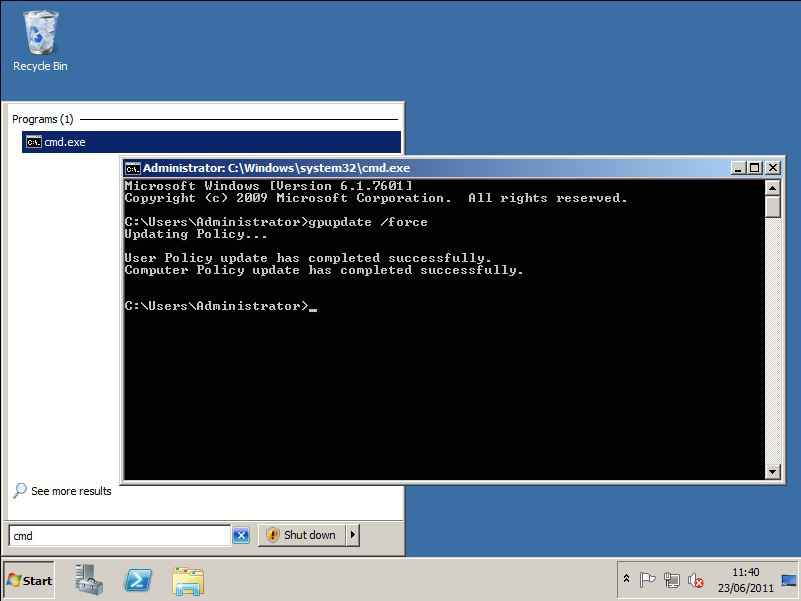
5. Then either reboot the clients, wait a couple of hours, or manually run "gpupdate /force" on them.


source:  http://www.petenetlive.com/KB/Article/0000471.htm